username:password
Configuration
Table of Contents
v2.6, 2018-04-27
Overview
This document describes how to configure the operator beyond the default configurations in addition to detailing what the configuration settings mean.
Openshift Container Platform
To run the Operator on Openshift Container Platform note the following requirements -
-
Openshift Container Platform 3.7 or greater is required due to the dependence on Custom Resource Definitions.
-
The
CO_CMDenvironment variable should be set toocwhen operating in an Openshift environment.
Security Configuration
Kube RBAC
The apiserver and postgres-operator containers access
Kubernetes resources and therefore require privileges for successful
Kubernetes interactions. The rbac.yaml file includes a set of roles
and bindings that allow the operator to work. These are fine grained
controls that you can adjust to your local Kubernetes cluster depending
on specific security requirements. The rbac.yaml file is executed when
the operator is first deployed to the Kubernetes cluster.
Permissions are granted to the Operator by means of a Service Account called postgres-operator. That service account is added through the Operator deployment.
|
Warning
|
If you are not using the demo namespace, it will be required to edit the following and change the namespace where the service account and cluster role bindings will be deployed.
|
See here for more details on how to enable RBAC roles and modify the scope of the permissions to suit your needs.
Basic Authentication
Basic authentication between the host and the apiserver is required. It will
be necessary to configure the pgo client to specify a basic authentication
username and password through the creation a file in the user’s home directory
named .pgouser. It will look similar to this, and contain only a single line -
The above excerpt specifies a username of username and a password of password. These values will be read by the pgo client and passed to the apiserver on each REST API call.
For the apiserver, a list of usernames and passwords is specified in the apiserver-conf-secret Secret. The values specified in a deployment are found in the following location -
$COROOT/conf/apiserver/pgouser
The sample configuration for pgouser is as follows -
username:password
testuser:testpass
Modify these values to be unique to your environment.
If the username and password passed by clients to the apiserver do not match, the REST call will fail and a log message will be produced in the apiserver container log. The client will receive a 401 HTTP status code if they are not able to authenticate.
If the pgouser file is not found in the home directory of the pgo user
then the next searched location is /etc/pgo/pgouser. If the file is not
found in either of the locations, the pgo client searches for the existence
of a PGOUSER environment variable in order to locate a path to the basic
authentication file.
Basic authentication can be entirely disabled by setting the BasicAuth
setting in the pgo.yaml configuration file to false.
Configure TLS
TLS is used to secure communications to the apiserver. Sample keys and certifications that can be used by TLS are found here -
$COROOT/conf/apiserver/server.crt
$COROOT/conf/apiserver/server.key
If you want to generate your own keys, you can use the script found in -
$COROOT/bin/make-certs.sh
The pgo client is required to use keys to connect to the apiserver. Specify the keys for pgo by setting the following environment variables -
export PGO_CA_CERT=$COROOT/conf/apiserver/server.crt
export PGO_CLIENT_CERT=$COROOT/conf/apiserver/server.crt
export PGO_CLIENT_KEY=$COROOT/conf/apiserver/server.key
The sample server keys are used as the client keys; adjust to suit security requirements.
For the apiserver TLS configuration, the keys are included in the
apiserver-conf-secret Secret when the apiserver is deployed. See the
$COROOT/deploy/deploy.sh script which is where the secret is created.
The apiserver listens on port 8443 (e.g. https://postgres-operator:8443) by default.
You can set InsecureSkipVerify to true by setting the NO_TLS_VERIFY
environment variable in the deployment.json file to true. By default
this value is set to false if you do not specify a value.
pgo RBAC
The pgo command line utility talks to the apiserver REST API instead of the Kubernetes API. It is therefore necessary for the pgo client to make use of RBAC configuration.
Starting in Release 2.6, the /conf/apiserver/pgorole file is used to define
some sample pgo roles, pgadmin and pgoreader.
These roles are meant as examples that you can configure to suit security
requirements as necessary. The pgadmin role grants a user authorization to
all pgo commands. The pgoreader only grants access to pgo commands that
display information such as pgo show cluster.
The pgorole file is read at start up time when the operator is deployed to
the Kubernetes cluster.
Also, the pgouser file now includes the role that is assigned to a specific
user as follows -
username:password:pgoadmin
testuser:testpass:pgoadmin
readonlyuser:testpass:pgoreader
The following list shows the current complete list of possible pgo permissions -
| Permission | Description |
|---|---|
ShowCluster |
allow pgo show cluster |
CreateCluster |
allow pgo create cluster |
TestCluster |
allow pgo test mycluster |
ShowBackup |
allow pgo show backup |
CreateBackup |
allow pgo backup mycluster |
DeleteBackup |
allow pgo delete backup mycluster |
Label |
allow pgo label |
Load |
allow pgo load |
CreatePolicy |
allow pgo create policy |
DeletePolicy |
allow pgo delete policy |
ShowPolicy |
allow pgo show policy |
ApplyPolicy |
allow pgo apply policy |
ShowPVC |
allow pgo show pvc |
CreateUpgrade |
allow pgo upgrade |
ShowUpgrade |
allow pgo show upgrade |
DeleteUpgrade |
allow pgo delete upgrade |
CreateUser |
allow pgo create user |
CreateFailover |
allow pgo failover |
User |
allow pgo user |
Version |
allow pgo version |
If the user is unauthorized for a pgo command, the user will get back this response -
FATA[0000] Authentication Failed: 40
apiserver Configuration
The postgres-operator pod includes the apiserver which is a REST API that pgo users are able to communicate with.
The apiserver uses the following configuration files found in $COROOT/conf/apiserver
to determine how the Operator will provision PostgreSQL containers -
$COROOT/conf/apiserver/pgo.yaml
$COROOT/conf/apiserver/pgo.lspvc-template.json
$COROOT/conf/apiserver/pgo.load-template.json
Note that the default pgo.yaml file assumes you are going to use HostPath Persistent Volumes for your storage configuration. It will be necessary to adjust this file for NFS or other storage configurations. Some examples of how are listed in the manual installation document.
The version of PostgreSQL container the Operator will deploy is determined by the CCPImageTag
setting in the $COROOT/conf/apiserver/pgo.yaml configuration file. By default, this value is
set to the latest release of the Crunchy Container Suite.
pgo.yaml
The default pgo.yaml configuration file, included in $COROOT/conf/apiserver/pgo.yaml,
looks like this -
BasicAuth:  true
Cluster:
  CCPImageTag:  centos7-10.3-1.8.2
  Port:  5432
  User:  testuser
  Database:  userdb
  PasswordAgeDays:  60
  PasswordLength:  8
  Strategy:  1
  Replicas:  0
PrimaryStorage: storage1
BackupStorage: storage1
ReplicaStorage: storage1
Storage:
  storage1:
    AccessMode:  ReadWriteMany
    Size:  200M
    StorageType:  create
  storage2:
    AccessMode:  ReadWriteMany
    Size:  333M
    StorageType:  create
  storage3:
    AccessMode:  ReadWriteMany
    Size:  440M
    StorageType:  create
DefaultContainerResource: small
ContainerResources:
  small:
    RequestsMemory:  2Gi
    RequestsCPU:  0.5
    LimitsMemory:  2Gi
    LimitsCPU:  1.0
  large:
    RequestsMemory:  8Gi
    RequestsCPU:  2.0
    LimitsMemory:  12Gi
    LimitsCPU:  4.0
Pgo:
  Audit:  false
  Metrics:  false
  LSPVCTemplate:  /config/pgo.lspvc-template.json
  CSVLoadTemplate:  /config/pgo.load-template.json
  COImagePrefix:  crunchydata
  COImageTag:  centos7-2.6
Values in the pgo configuration file have the following meaning:
| Setting | Definition |
|---|---|
|
if set to true will enable Basic Authentication |
|
newly created containers will be based on this image version (e.g. centos7-10.3-1.8.1), unless you override it using the --ccp-image-tag command line flag |
|
the PostgreSQL port to use for new containers (e.g. 5432) |
|
the PostgreSQL normal user name |
|
sets the deployment strategy to be used for deploying a cluster, currently there is only strategy 1 |
|
the number of cluster replicas to create for newly created clusters |
|
optional, list of policies to apply to a newly created cluster, comma separated, must be valid policies in the catalog |
|
optional, if set, will set the VALID UNTIL date on passwords to this many days in the future when creating users or setting passwords, defaults to 60 days |
|
optional, if set, will determine the password length used when creating passwords, defaults to 8 |
|
required, the value of the storage configuration to use for the primary PostgreSQL deployment |
|
required, the value of the storage configuration to use for backups |
|
required, the value of the storage configuration to use for the replica PostgreSQL deployments |
|
for a dynamic storage type, you can specify the storage class used for storage provisioning(e.g. standard, gold, fast) |
|
the access mode for new PVCs (e.g. ReadWriteMany, ReadWriteOnce, ReadOnlyMany). See below for descriptions of these. |
|
the size to use when creating new PVCs (e.g. 100M, 1Gi) |
|
supported values are either dynamic, existing, create, or emptydir, if not supplied, emptydir is used |
|
optional, if set, will cause a SecurityContext and fsGroup attributes to be added to generated Pod and Deployment definitions |
|
optional, if set, will cause a SecurityContext to be added to generated Pod and Deployment definitions |
|
optional, the value of the container resources configuration to use for all database containers, if not set, no resource limits or requests are added on the database container |
|
request size of memory in bytes |
|
request size of CPU cores |
|
request size of memory in bytes |
|
request size of CPU cores |
|
request size of memory in bytes |
|
request size of CPU cores |
|
request size of memory in bytes |
|
request size of CPU cores |
|
the PVC lspvc template file that lists PVC contents |
|
the load template file used for load jobs |
|
image tag prefix to use for the Operator containers |
|
image tag to use for the Operator containers |
|
boolean, if set to true will cause each apiserver call to be logged with an audit marking |
|
boolean, if set to true will cause each new cluster to include crunchy-collect as a sidecar container for metrics collection, if set to false (default), users can still add metrics on a cluster-by-cluster basis using the pgo command flag --metrics |
Storage Configurations
You can now define n-number of Storage configurations within the pgo.yaml file. Those Storage configurations follow these conventions -
-
they must have lowercase name (e.g. storage1)
-
they must be unique names (e.g. mydrstorage, faststorage, slowstorage)
These Storage configurations are referenced in the BackupStorage, ReplicaStorage, and PrimaryStorage configuration values. However, there are command line options in the pgo client that will let a user override these default global values to offer you the user a way to specify very targeted storage configurations when needed (e.g. disaster recovery storage for certain backups).
You can set the storage AccessMode values to the following -
-
ReadWriteMany - mounts the volume as read-write by many nodes
-
ReadWriteOnce - mounts the PVC as read-write by a single node
-
ReadOnlyMany - mounts the PVC as read-only by many nodes
These Storage configurations are validated when the pgo-apiserver starts, if a non-valid configuration is found, the apiserver will abort. These Storage values are only read at apiserver start time.
The following StorageType values are possible -
-
dynamic - this will allow for dynamic provisioning of storage using a StorageClass.
-
existing - This setting allows you to use a PVC that already exists. For example, if you have a NFS volume mounted to a PVC, all PostgreSQL clusters can write to that NFS volume mount via a common PVC. When set, the Name setting is used for the PVC.
-
create - This setting allows for the creation of a new PVC for each PostgreSQL cluster using a naming convention of clustername-pvc*. When set, the Size, AccessMode settings are used in constructing the new PVC.
-
emptydir - If a StorageType value is not defined, emptydir is used by default. This is a volume type that’s created when a pod is assigned to a node and exists as long as that pod remains running on that node; it is deleted as soon as the pod is manually deleted or removed from the node.
The operator will create new PVCs using the naming convention dbname-pvc where dbname is the database name you have specified. For example, if you run -
pgo create cluster example1
It will result in a PVC being created named example1-pvc and in the case of a backup job, the pvc is named example1-backup-pvc
There are currently 3 sample pgo configuration files provided for users to use as a starting configuration -
-
pgo.yaml.emptydir- this configuration specifies emptydir storage to be used for databases -
pgo.yaml.nfs- this configuration specifies create storage to be used, this is used for NFS storage for example where you want to have a unique PVC created for each database -
pgo.yaml.dynamic- this configuration specifies dynamic storage to be used, namely a storageclass that refers to a dynamic provisioning strorage such as StorageOS or Portworx, or GCE.
Overriding Container Resources Configuration Defaults
In the pgo.yaml configuration file you have the option to configure a default container resources configuration that when set will add CPU and memory resource limits and requests values into each database container when the container is created.
You can also override the default value using the --resources-config command flag when creating a new cluster -
pgo create cluster testcluster --resources-config=large
Note, if you try to allocate more resources than your
host or Kube cluster has available then you will see your
pods wait in a Pending status. The output from a kubectl describe pod
command will show output like this in this event -
Events:
  Type     Reason            Age               From               Message
  ----     ------            ----              ----               -------
  Warning  FailedScheduling  49s (x8 over 1m)  default-scheduler  No nodes are available that match all of the predicates: Insufficient memory (1).
Overriding Storage Configuration Defaults
pgo create cluster testcluster --storage-config=bigdisk
That example will create a cluster and specify a storage configuration of bigdisk to be used for the primary database storage. The replica storage will default to the value of ReplicaStorage as specified in pgo.yaml.
pgo create cluster testcluster2 --storage-config=fastdisk --replica-storage-config=slowdisk
That example will create a cluster and specify a storage configuration of fastdisk to be used for the primary database storage, while the replica storage will use the storage configuration slowdisk.
pgo backup testcluster --storage-config=offsitestorage
That example will create a backup and use the offsitestorage storage configuration for persisting the backup.
Disaster Recovery Using Storage Configurations
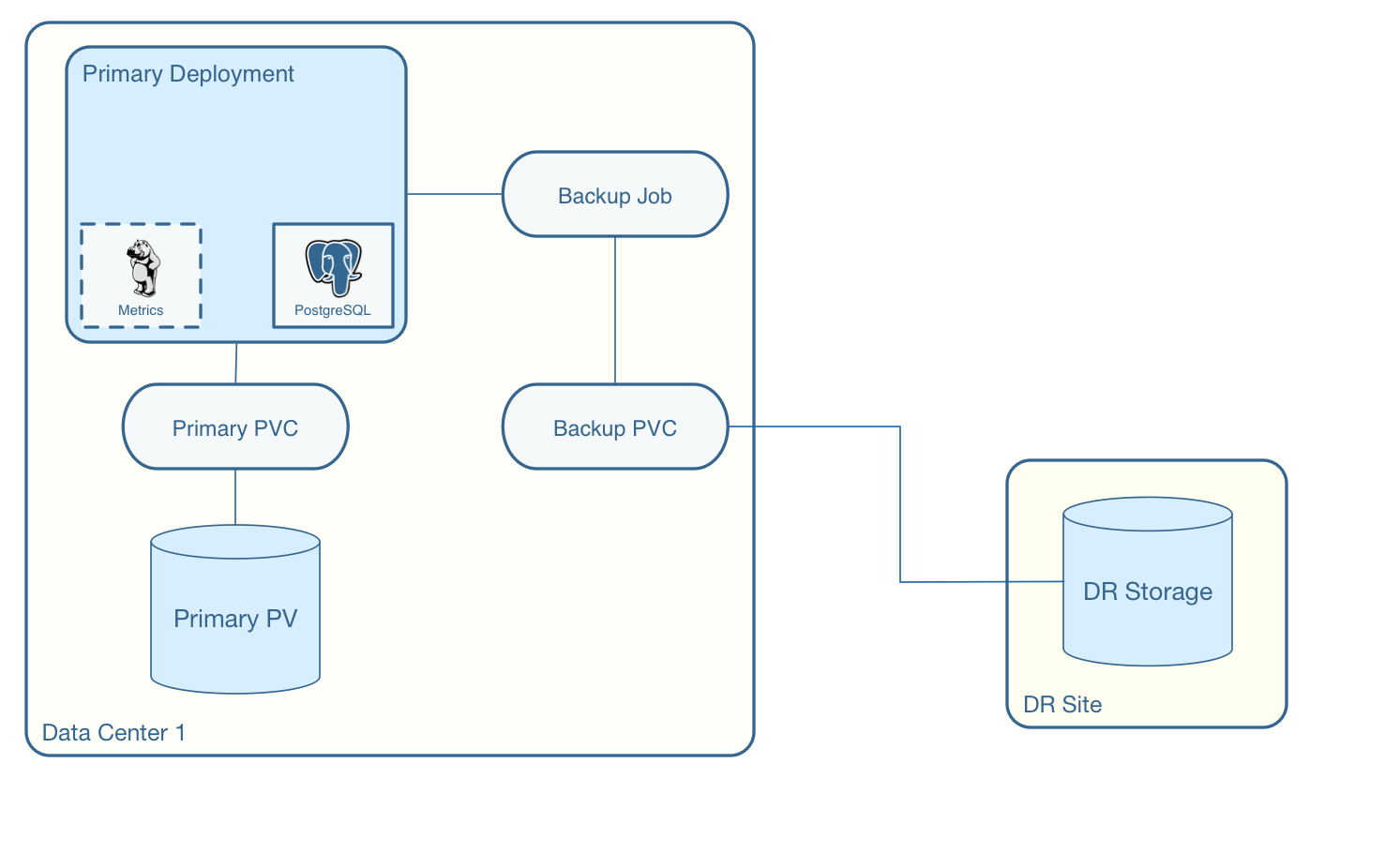
A simple mechanism for partial disaster recovery can be obtained by leveraging network storage, Kubernetes storage classes, and the storage configuration options within the Operator.
For example, if you define a Kubernetes storage class that refers to a storage backend that is running within your disaster recovery site, and then use that storage class as a storage configuration for your backups, you essentially have moved your backup files automatically to your disaster recovery site thanks to network storage.
postgres-operator Container Configuration
To enable debug level messages from the operator pod, set the CRUNCHY_DEBUG environment
variable to true within its deployment file deployment.json.
Operator Templates
The database and cluster Kubernetes objects that get created by the operator are based on JSON templates that are added into the operator deployment by means of a mounted volume.
The templates are located in the $COROOT/conf/postgres-operator directory and are added into
a config map which is mounted by the operator deployment.
bash Completion
There is a bash completion file that is included for users to try
located in the repository at examples/pgo-bash-completion. To use it -
cp $COROOT/examples/pgo-bash-completion /etc/bash_completion.d/pgo
su - $USER
REST API
Because the apiserver implements a REST API, it is possible to integrate with it using your own application code. To demonstrate this, the following curl commands show the API usage -
pgo version
curl -v -X GET -u readonlyuser:testpass -H "Content-Type: application/json" --insecure https://10.101.155.218:8443/version
pgo show policy all
curl -v -X GET -u readonlyuser:testpass -H "Content-Type: application/json" --insecure https://10.101.155.218:8443/policies/all
pgo show pvc danger-pvc
curl -v -X GET -u readonlyuser:testpass -H "Content-Type: application/json" --insecure https://10.101.155.218:8443/pvc/danger-pvc
pgo show cluster mycluster
curl -v -X GET -u readonlyuser:testpass -H "Content-Type: application/json" --insecure https://10.101.155.218:8443/clusters/mycluster
pgo show upgrade mycluster
curl -v -X GET -u readonlyuser:testpass -H "Content-Type: application/json" --insecure https://10.101.155.218:8443/upgrades/mycluster
pgo test mycluster
curl -v -X GET -u readonlyuser:testpass -H "Content-Type: application/json" --insecure https://10.101.155.218:8443/clusters/test/mycluster
pgo show backup mycluster
curl -v -X GET -u readonlyuser:testpass -H "Content-Type: application/json" --insecure https://10.101.155.218:8443/backups/mycluster
Deploying pgpool
One option with pgo is enabling the creation of a pgpool deployment in addition to the PostgreSQL cluster. Running pgpool is a logical inclusion when the Kubernetes cluster includes both a primary database in addition to some number of replicas deployed. The current pgpool configuration deployed by the operator only works when both a primary and a replica are running.
When a user creates the cluster a command flag can be passed as follows to enable the creation of the pgpool deployment.
pgo create cluster cluster1 --pgpool
pgo scale cluster1
This will cause the operator to create a Deployment that includes the crunchy-pgpool container along with a replica. That container will create a configuration that will perform SQL routing to your cluster services, both for the primary and replica services.
Pgpool examines the SQL it receives and routes the SQL statement to either the primary or replica based on the SQL action. Specifically, it will send writes and updates to only the primary service. It will send read-only statements to the replica service.
When the operator deploys the pgpool container, it creates a secret (e.g. mycluster-pgpool-secret) that contains pgpool configuration files. It fills out templated versions of these configuration files specifically for this PostgreSQL cluster.
Part of the pgpool deployment also includes creating a pool_passwd file that will allow the testuser credential
to authenticate to pgpool. Adding additional users to the pgpool configuration currently requires human intervention
specifically creating a new pgpool secret and bouncing the pgpool pod to pick up the updated secret. Future operator
releases will attempt to provide pgo commands to let you automate the addition or removal of a pgpool user.
Currently to update a pgpool user within the pool_passwd configuration file, it is necessary to copy the existing
files from the secret to your local system, update the credentials in pool_passwd with the new user credentials,
recreate the pgpool secret, and finally restart the pgpool pod to pick up the updated configuration files.
As an example -
kubectl cp demo/wed10-pgpool-6cc6f6598d-wcnmf:/pgconf/ /tmp/foo
That command gets a running set of secret pgpool configuration files and places them locally on your system for you to edit.
pgpool requires a specially formatted password credential to be placed into pool_passwd. There is a golang program
included in $COROOT/golang-examples/gen-pgpool-pass.go that, when run, will generate the value to use within the
pgpool_passwd configuration file.
go run $COROOT/golang-examples/gen-pgpool-pass.go
Enter Username: testuser
Enter Password:
Password typed: e99Mjt1dLz
hash of password is [md59c4017667828b33762665dc4558fbd76]
The value md59c4017667828b33762665dc4558fbd76 is what you will use in the pool_passwd file.
Then, create the new secrets file based on those updated files -
$COROOT/bin/create-pgpool-secrets.sh
Lastly for pgpool to pick up the new secret file, delete the existing deployment pod -
kubectl get deployment wed-pgpool
kubectl delete pod wed10-pgpool-6cc6f6598d-wcnmf
The pgpool deployment will spin up another pgpool which will pick up the updated secret file.