How it Works
Table of Contents
v2.6, 2018-04-27
Reference Architecture
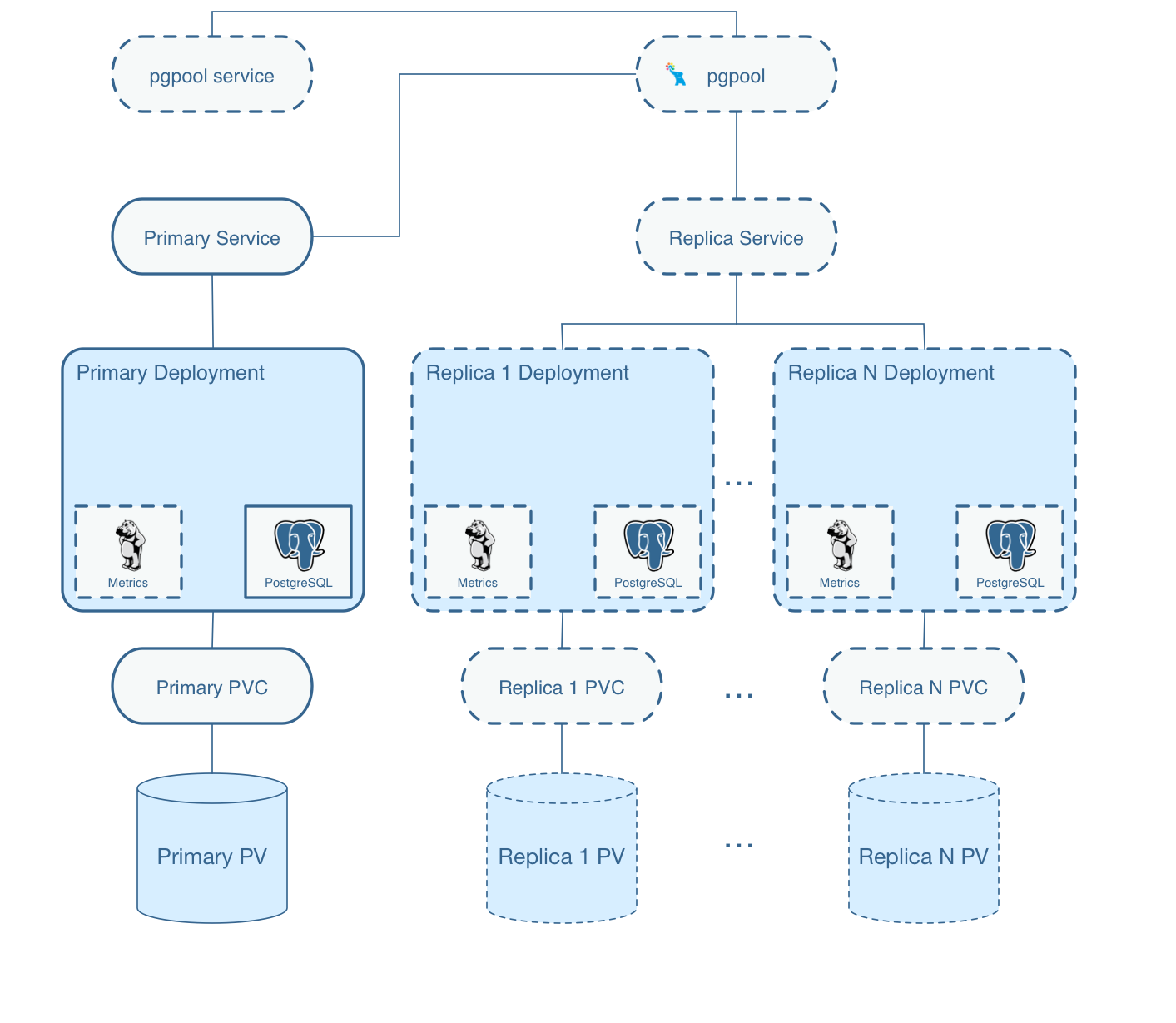
So, what does the Postgres Operator actually deploy when you create a cluster?
On this diagram, objects with dashed lines are components that are optionally deployed as part of a PostgreSQL Cluster by the operator. Objects with solid lines are the fundamental and required components.
For example, within the Primary Deployment, the metrics container is completely optional. That component can be deployed using either the operator configuration or command line arguments if you want to cause metrics to be collected from the Postgres container.
Replica deployments are similar to the primary deployment but are optional. A replica is not required to be created unless the capability for one is necessary. As you scale up the Postgres cluster, the standard set of components gets deployed and replication to the primary is started.
Notice that each cluster deployment gets its own unique Persistent Volumes. Each volume can use different storage configurations which is quite powerful.
Custom Resource Definitions
Kubernetes Custom Resource Definitions are used in the design of the PostgreSQL Operator to define the following -
-
Cluster - pgclusters
-
Backup - pgbackups
-
Upgrade - pgupgrades
-
Policy - pgpolicies
-
Tasks - pgtasks
Command Line Interface
The pgo command line interface (CLI) is used by a normal end-user to create databases or clusters, or make changes to existing databases.
The CLI interacts with the apiserver REST API deployed within the postgres-operator deployment.
From the CLI, users can view existing clusters that were deployed using the CLI and Operator. Objects that were not previously created by the Crunchy Operator are now viewable from the CLI.
Operator Deployment
The PostgreSQL Operator runs within a Deployment in the Kubernetes cluster. An administrator will deploy the operator deployment using the provided script. Once installed and running, the Operator pod will start watching for certain defined events.
The operator watches for create/update/delete actions on the pgcluster custom resource definitions. When the CLI creates for example a new pgcluster custom resource definition, the operator catches that event and creates pods and services for that new cluster request.
CLI Design
The CLI uses the cobra package to implement CLI functionality like help text, config file processing, and command line parsing.
The pgo client is essentially a REST client which communicates to the pgo-apiserver REST server running within the Operator pod. In some cases you might want to split the apiserver out into its own Deployment but the default deployment has a consolidated pod that contains both the apiserver and operator containers simply for convenience of deployment and updates.
Verbs
A user works with the CLI by entering verbs to indicate what they want to do, as follows.
pgo show cluster all
pgo delete cluster db1 db2 db3
pgo create cluster mycluster
In the above example, the show, backup, delete, and create verbs are used. The CLI is case sensitive and supports only lowercase.
Affinity
You can have the Operator add an affinity section to a new Cluster Deployment if you want to cause Kubernetes to attempt to schedule a primary cluster to a specific Kubernetes node.
You can see the nodes on your Kube cluster by running the following -
kubectl get nodes
You can then specify one of those names (e.g. kubeadm-node2) when creating a cluster -
pgo create cluster thatcluster --node-name=kubeadm-node2
The affinity rule inserted in the Deployment will used a preferred strategy so that if the node were down or not available, Kube would go ahead and schedule the Pod on another node.
You can always view the actual node your cluster pod is scheduled on through the following command.
kubectl get pod -o wide
When you scale up a Cluster and add a replica, the scaling will
take into account the use of --node-name. If it sees that a
cluster was created with a specific node name, then the replica
Deployment will add an affinity rule to attempt to schedule
the replica on a different node than the node the primary is
schedule on. This provides a simple version of high availability and
causes the primary and replicas to not live on the same Kubernetes
node.
Debugging
To see if the operator pod is running enter the following -
kubectl get pod -l 'name=postgres-operator'To verify the operator is running and has deployed the Custom Resources execute the following -
kubectl get crd
The full list of CRDs that are created over time are shown below.
NAME                               KIND
pgbackups.cr.client-go.k8s.io      CustomResourceDefinition.v1beta1.apiextensions.k8s.io
pgclusters.cr.client-go.k8s.io     CustomResourceDefinition.v1beta1.apiextensions.k8s.io
pgpolicies.cr.client-go.k8s.io     CustomResourceDefinition.v1beta1.apiextensions.k8s.io
pgpolicylogs.cr.client-go.k8s.io   CustomResourceDefinition.v1beta1.apiextensions.k8s.io
pgupgrades.cr.client-go.k8s.io     CustomResourceDefinition.v1beta1.apiextensions.k8s.io
pgtasks.cr.client-go.k8s.io        CustomResourceDefinition.v1beta1.apiextensions.k8s.io
Persistent Volumes
Currently, the operator does not delete persistent volumes by default. Instead, it deletes the claims on the volumes. Starting with release 2.4, the Operator will create Jobs that actually run rm commands on the data volumes before actually removing the Persistent Volumes if the user passes a `--delete-data ` flag when deleting a database cluster.
Likewise, if the user passes --delete-backups during cluster deletion
a Job is created to remove all the backups for a cluster include
the related Persistent Volume.
PostgreSQL Operator Deployment Strategies
This section describes the various deployment strategies offered by the operator. A deployment in this case is the set of objects created in Kubernetes when a custom resource definition of type pgcluster is created. CRDs are created by the pgo client command and acted upon by the postgres operator.
Strategies
To support different types of deployments, the operator supports multiple strategy implementations. Currently there is only a default cluster strategy.
In the future, more deployment strategies will be supported to offer users more customization to what they see deployed in their Kubernetes cluster.
Being open source, users can also write their own strategy!
Specifying a Strategy
In the pgo client configuration file, there is a `CLUSTER.STRATEGY `setting. The current value of the default strategy is 1. If you don’t set that value, the default strategy is assumed. If you set that value to something not supported, the operator will log an error.
Strategy Template Files
Each strategy supplies its set of templates used by the operator to create new pods, services, etc.
When the operator is deployed, part of the deployment process
is to copy the required strategy templates into a ConfigMap (operator-conf)
that gets mounted into /operator-conf within the operator pod.
The directory structure of the strategy templates is as follows -
|-- backup-job.json
|-- cluster
|   |-- 1
|       |-- cluster-deployment-1.json
|       |-- cluster-replica-deployment-1.json
|       |-- cluster-service-1.json
|
|-- pvc.json
In this structure, each strategy’s templates live in a subdirectory that matches the strategy identifier. The default strategy templates are denoted by the value of 1 in the directory structure above.
If you add another strategy, the file names must be unique within the entire strategy directory. This is due to the way the templates are stored within the ConfigMap.
Default Cluster Deployment Strategy (1)
Using the default cluster strategy, a cluster when created by the operator will create the following on a Kubernetes cluster -
-
deployment running a Postgres primary container with replica count of 1
-
service mapped to the primary Postgres database
-
service mapped to the replica Postgres database
-
PVC for the primary will be created if not specified in configuration, this assumes you are using a non-shared volume technology (e.g. Amazon EBS), if the
CLUSTER.PVC_NAMEvalue is set in your configuration then a shared volume technology is assumed (e.g. HostPath or NFS), if a PVC is created for the primary, the naming convention is clustername-pvc where clustername is the name of your cluster.
If you want to add a Postgres replica to a cluster, you will scale the cluster. For each replica-count, a Deployment will be created that acts as a PostgreSQL replica.
This is very different than using a StatefulSet to scale up PostgreSQL. Why would you do it this way? Imagine a case where you want different parts of your PostgreSQL cluster to use different storage configurations,. With this method, it can be done through using specific placement and deployments of each part of the cluster.
This same concept applies to node selection for the PostgreSQL cluster components. The Operator will let you define precisely which node that the PostgreSQL component should be placed upon using node affinity rules.
Cluster Deletion
When you run the following, the cluster and its services will be deleted. However, the data files and backup files will remain as well as the PVCs for this cluster.
pgo delete cluster mycluster
However, to remove the data files from the PVC you can pass the following flag -
--delete-data
This causes a workflow to be started to remove the data files on the primary cluster deployment PVC.
The following flag will cause all of the backup files to be removed.
--delete-backups
The data removal workflow includes the following steps -
-
create a pgtask CRD to hold the PVC name and cluster name to be removed
-
the CRD is watched, and on an ADD will cause a Job to be created that will run the rmdata container using the PVC name and cluster name as parameters which determine the PVC to mount, and the file path to remove under that PVC
-
the rmdata Job is watched by the Operator, and upon a successful status completion the actual PVC is removed
This workflow insures that a PVC is not removed until all the data files are removed. Also, a Job was used for the removal of files since that can be a time consuming task.
The files are removed by the rmdata container which essentially issues the following command to remove the files -
rm -rf /pgdata/<some path>
Custom Postgres Configurations
Starting in release 2.5, users and administrators can specify a custom set of Postgres configuration files be used when creating a new Postgres cluster. The configuration files you can change include -
-
postgresql.conf
-
pg_hba.conf
-
setup.sql
Different configurations for PostgreSQL might be defined for the following -
-
OLTP types of databases
-
OLAP types of databases
-
High Memory
-
Minimal Configuration for Development
-
Project Specific configurations
-
Special Security Requirements
Global ConfigMap
If you create a configMap called pgo-custom-pg-config with any of the above files within it, new clusters will use those configuration files when setting up a new database instance. You do NOT have to specify all of the configuration files. It is entirely up to your use case to determine which to use.
An example set of configuration files and a script to create the global configMap is found at -
$COROOT/examples/custom-config
If you run the create.sh script there, it will create the configMap that will include the PostgreSQL configuration files within that directory.
Config Files Purpose
The postgresql.conf file is the main Postgresql configuration file that allows the definition of a wide variety of tuning parameters and features.
The pg_hba.conf file is the way Postgresql secures client access.
The setup.sql file is a Crunchy Container Suite configuration file used to initially populate the database after the initial initdb is run when the database is first created. Changes would be made to this if you wanted to define which database objects are created by default.
Granular Config Maps
Granular config maps can be defined if it is necessary to use
a different set of configuration files for different clusters
rather than having a single configuration (e.g. Global Config Map).
A specific set of ConfigMaps with their own set of PostgreSQL
configuration files can be created. When creating new clusters, a
--custom-config flag can be passed along with the name of the
ConfigMap which will be used for that specific cluster or set of
clusters.
Defaults
If there’s no reason to change the default PostgreSQL configuration files that ship with the Crunchy Postgres container, there’s no requirement to. In this event, continue using the Operator as usual and avoid defining a global configMap.
Labeling
When a custom configMap is used in cluster creation, the Operator labels the primary Postgres Deployment with a label of custom-config and a value of what configMap was used when creating the database.
Commands coming in future releases will take advantage of this labeling.
Metrics Collection
If you add a --metrics flag to pgo create cluster it will cause the crunchy-collect container to be added to your Postgres cluster.
That container requires you run the crunchy-metrics containers as defined within the crunchy-containers project.
The prometheus push gateway that is deployed as part of the crunchy-metrics example is a current requirement for the metrics solution. This will change in an upcoming release of the crunchy-containers project and there will no longer be a requirement for the push gateway to be deployed.
See the crunchy-containers Metrics example for more details on setting up the crunchy-metrics solution.